Peptide Reconstitution Calculator: Calculate Your Peptide Dose
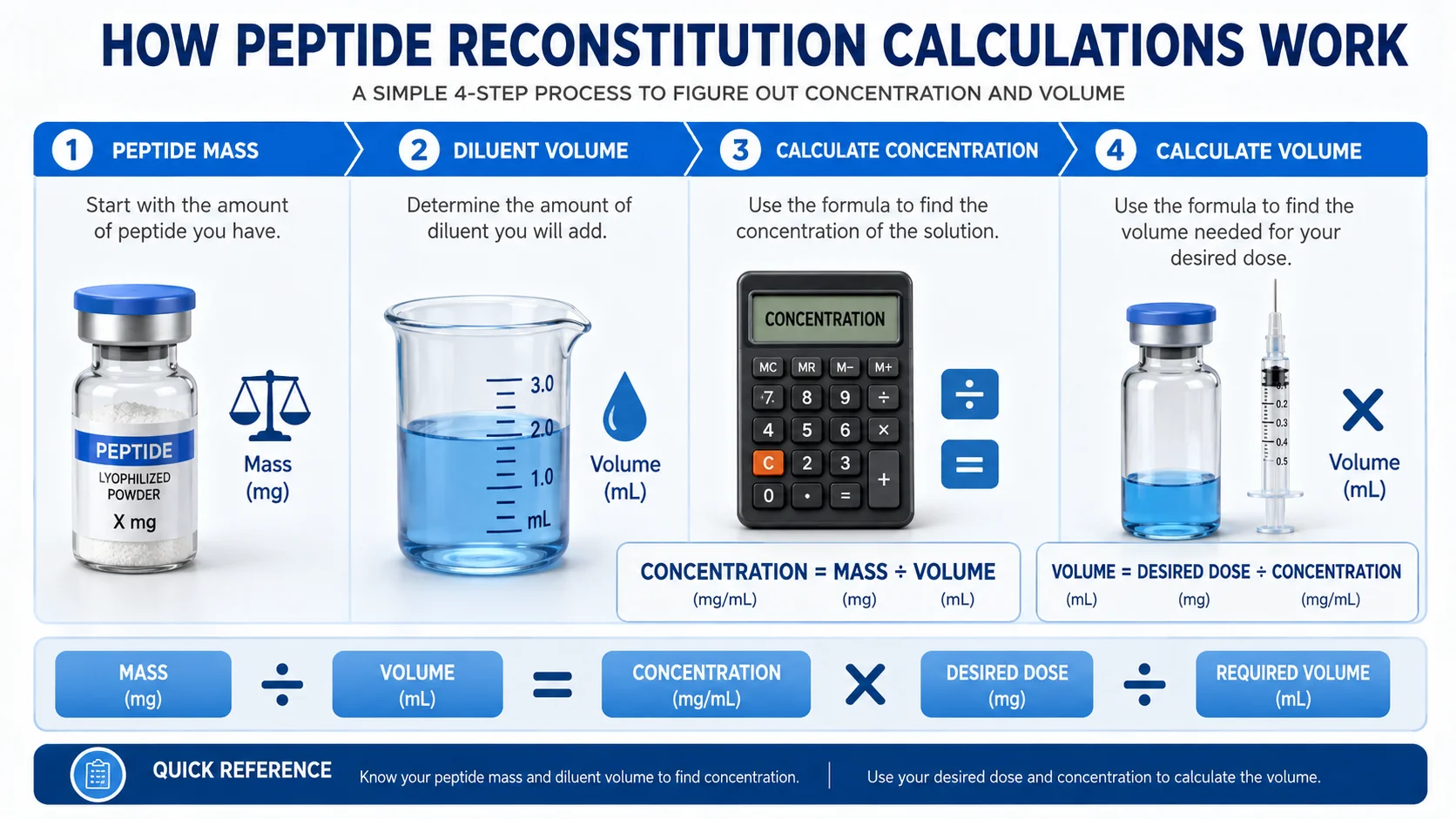
A peptide reconstitution calculator helps you work out the concentration of a reconstituted peptide and convert a prescribed amount into a measurable liquid volume. Enter the peptide mass, the amount of diluent used, and the intended dose to calculate the concentration and volume needed.
This guide explains the basic math behind peptide reconstitution, shows practical examples, and helps you understand what the calculator results mean. Always follow instructions provided by a qualified healthcare professional and the specific product information for any medication or peptide you use.
Table of Contents
What Is a Peptide Reconstitution Calculator?
A peptide reconstitution calculator is a tool used to calculate the concentration created when a known peptide mass is mixed with a known volume of liquid. It can then help convert a required dose into the corresponding liquid volume.
For example, imagine a vial contains 10 mg of material and is mixed with 2 mL of diluent. The resulting concentration is:
10 mg ÷ 2 mL = 5 mg/mL
Once the concentration is known, a calculator can determine the liquid volume associated with a specific prescribed dose.
This is where unit conversion matters. A calculation involving mg, mcg, mL, or syringe units can look simple, but entering one value incorrectly can produce a result that is off by a factor of 10 or even 1,000.
How Peptide Reconstitution Calculations Work
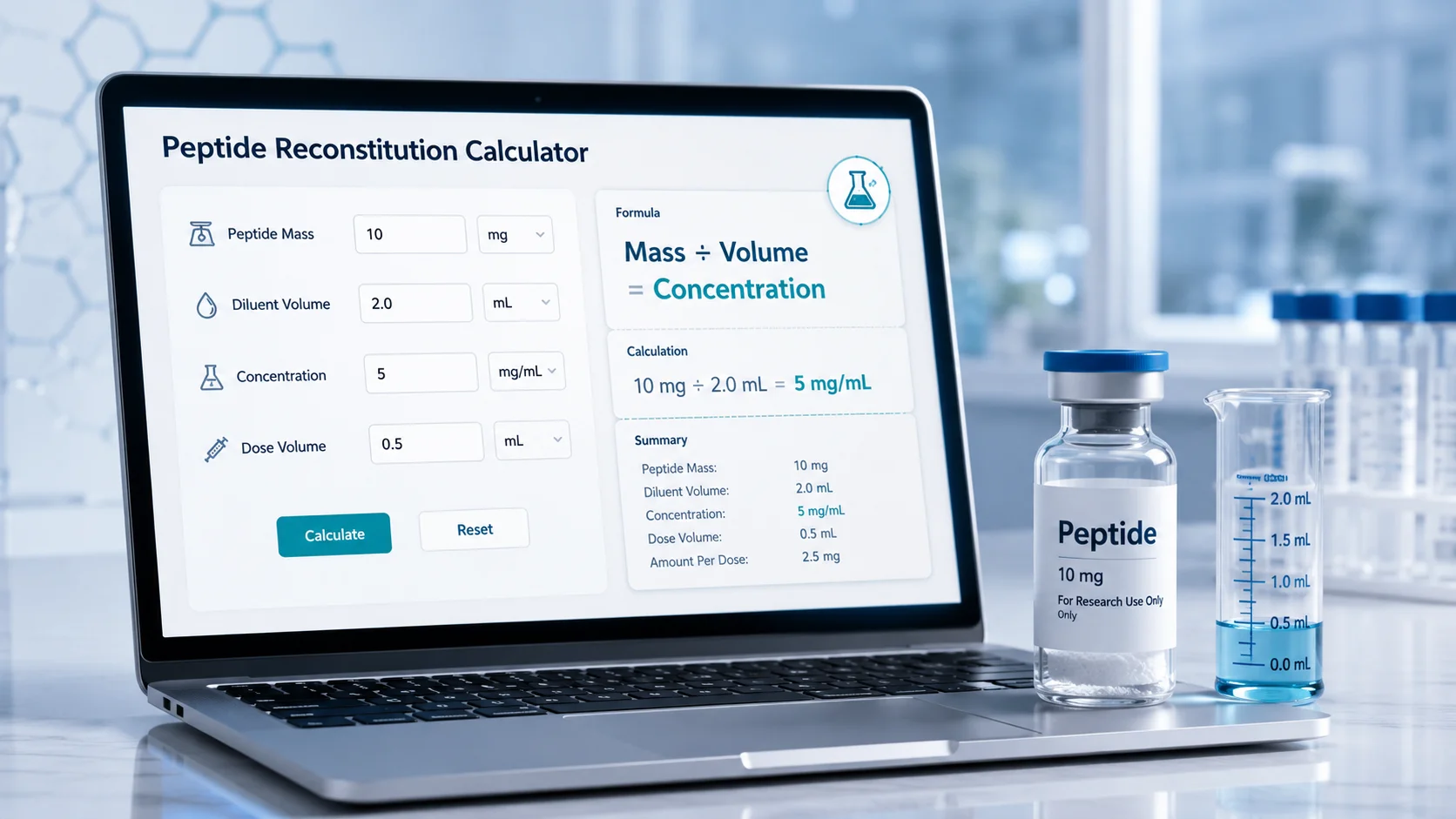
The basic principle is concentration:
Concentration = Total peptide mass ÷ Total liquid volume
You then use that concentration to determine the volume corresponding to a selected dose:
Required volume = Desired dose ÷ Concentration
A calculator handles these conversions automatically, but understanding the relationship between the values makes it easier to check the result.
The three inputs that matter
Most calculations depend on three core numbers:
- Peptide mass—the total amount contained in the vial, such as 5 mg or 10 mg.
- Diluent volume—the amount of liquid used for reconstitution, measured in mL.
- Desired dose—the amount specified for one dose, often expressed in mg or mcg.
The calculator first determines how much material is present per milliliter. It then calculates how many milliliters correspond to the selected dose.
A useful way to think about it
Reconstitution changes the concentration, not the total amount of peptide.
If a vial contains 10 mg:
- Mixed with 1 mL = 10 mg/mL
- Mixed with 2 mL = 5 mg/mL
- Mixed with 4 mL = 2.5 mg/mL
The vial still contains 10 mg in total in each example. Only the concentration per mL changes.
That distinction is a useful calculation check and can prevent one of the most common misunderstandings when comparing different reconstitution volumes.
Peptide Reconstitution Formula Explained
Here is the basic formula used for Peptide Reconstitution Calculator:
Step 1: Calculate concentration.
Concentration (mg/mL) = Peptide mass (mg) ÷ Diluent volume (mL)
Example:
10 mg ÷ 2 mL = 5 mg/mL
The final concentration is 5 mg/mL.
Step 2: Calculate the required volume.
If the prescribed dose is known:
Volume (mL) = Desired dose (mg) ÷ Concentration (mg/mL)
For a 1 mg dose using a 5 mg/mL concentration:
1 mg ÷ 5 mg/mL = 0.2 mL
The mathematical result is 0.2 mL.
If a dose is provided in micrograms, convert units before calculating when necessary:
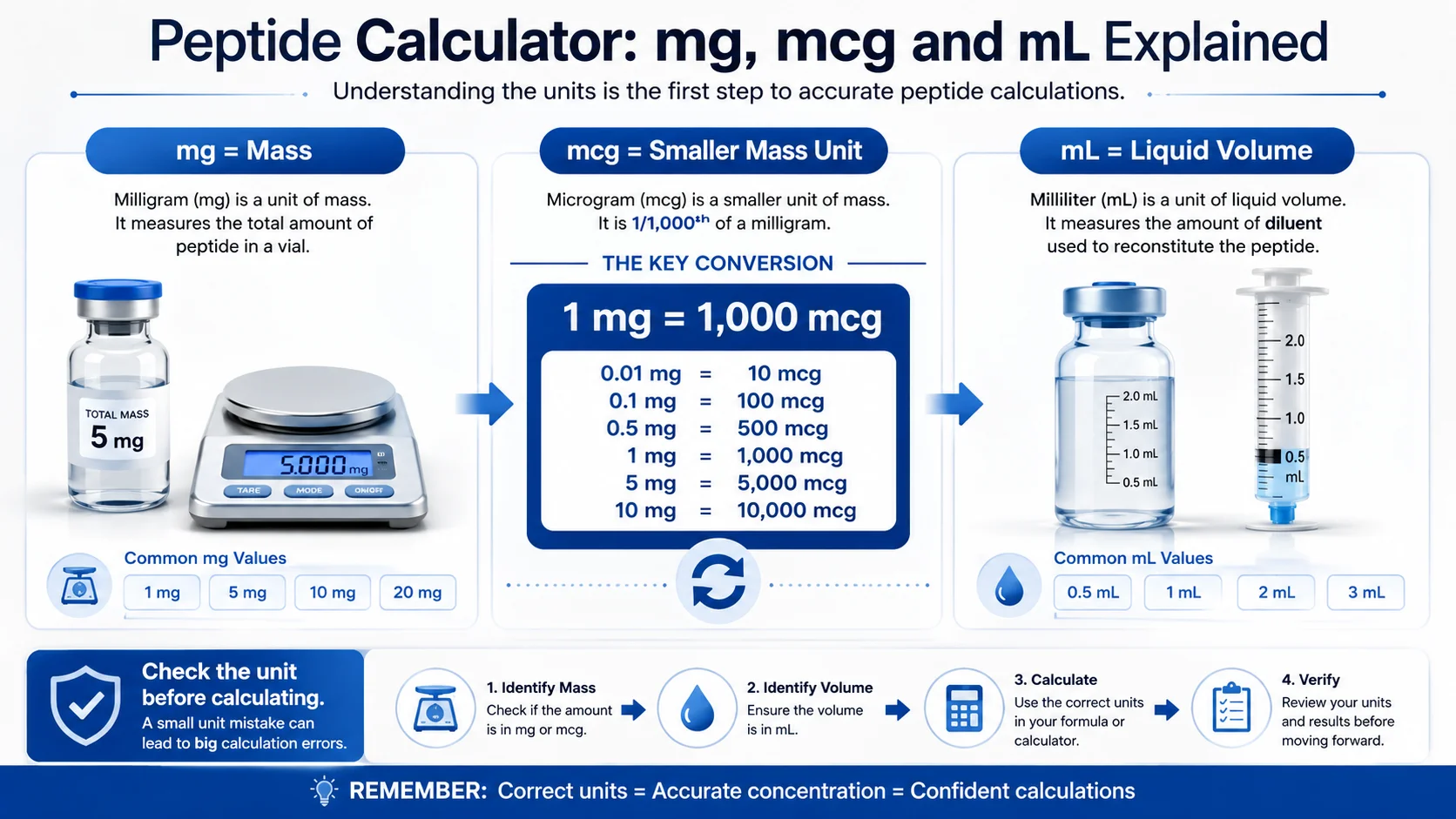
1 mg = 1,000 mcg
For example:
500 mcg = 0.5 mg
Using consistent units throughout the calculation is essential.
Peptide Calculator mg Understanding Mass Inputs
A peptide calculator mg input refers to the total mass of material in the vial or the required dose when the calculation uses milligrams.
For example, these are different quantities:
| Value | What It May Represent |
|---|---|
| 10 mg | Total amount in a vial |
| 2 mL | Volume of diluent |
| 5 mg/mL | Final concentration |
| 1 mg | Example desired dose |
| 0.2 mL | Calculated liquid volume |
One of the easiest mistakes is confusing the total vial mass with the dose mass.
A 10 mg vial does not automatically mean that every dose is 10 mg. The number of doses depends on the prescribed dose and how the product is intended to be used.
Peptide Calculator Dose How Dose Conversion Works
A peptide calculator dose calculation starts with the dose amount and works backwards to determine the corresponding liquid volume based on the known concentration.
Here is a simple example:
- Total mass: 5 mg
- Diluent: 2 mL
- Desired dose: 0.5 mg
First calculate concentration:
5 mg ÷ 2 mL = 2.5 mg/mL
Then calculate the volume:
0.5 mg ÷ 2.5 mg/mL = 0.2 mL
The key is to keep the units consistent. If one value is entered in mg and another in mcg, convert one of them before comparing or calculating.
A Practical Example Check the Concentration First
Here is a useful calculator habit that is often overlooked: check the concentration before looking at syringe volume.
Suppose two people each have a 10 mg total mass but use different liquid volumes:
Example A
10 mg mixed with 1 mL
Concentration:
10 mg/mL
Example B
10 mg mixed with 4 mL
Concentration:
2.5 mg/mL
The same numerical dose would require a different liquid volume in each example because the concentrations are different.
This means syringe markings or liquid volume alone do not tell you the dose unless the concentration is known. That is why a good calculation workflow is
Mass → Diluent volume → Concentration → Desired dose → Calculated volume
This “concentration-first check” is a simple extra step that can make calculator results easier to verify.
Understanding mg, mcg, mL and Syringe Units
Several measurement systems can appear in the same calculation.
mg: Milligrams
A milligram measures mass.
1 mg = 1,000 mcg
mcg: Micrograms
A microgram is a smaller unit of mass.
Examples:
- 1 mg = 1,000 mcg
- 0.5 mg = 500 mcg
- 0.1 mg = 100 mcg
mL: Milliliters
A milliliter measures liquid volume.
A concentration such as 5 mg/mL means there are 5 milligrams of material in each milliliter of the prepared liquid.
Syringe units
“Syringe units” should not be confused with mg or mcg. The meaning of a marking depends on the syringe scale and its calibration.
For example, on a U-100 insulin syringe, 100 units corresponds to 1 mL of volume, but that does not mean 100 units equals a fixed number of milligrams of a particular medication or peptide. The mg amount depends on the concentration of the liquid.
Always confirm the syringe type and markings rather than assuming that a “unit” is a universal dose measurement.
How to Use a Peptide Calculator Online
An online Peptide Reconstitution Calculator can simplify the arithmetic by keeping the inputs and units organized.
A typical workflow looks like this:
- Enter the total peptide mass shown for the product.
- Enter the liquid volume used for reconstitution.
- Select or enter the desired dose using the correct unit.
- Check that mg and mcg values are correctly converted.
- Review the calculated concentration.
- Review the calculated liquid volume.
- Compare all inputs with the instructions provided by your healthcare professional or product documentation.
The calculator should be used as a mathematical tool, not as a source for choosing a dose or deciding how much diluent to use.
Peptide Calculator for Tirzepatide: Why Product Instructions Matter
Searches for a Peptide Reconstitution Calculator for tirzepatide often involve users trying to convert a prescribed amount into a liquid volume. However, calculations should not be used to independently determine treatment doses or reconstitution instructions.
Different products, formulations, concentrations, and presentation types may have different instructions. A calculation based on one concentration cannot safely be transferred to a different product simply because the medication name or total mass appears similar.
For medication-specific use, rely on the prescribing information, packaging instructions, and guidance from a qualified healthcare professional or pharmacist.
The same principle applies to compounded or other specially prepared products: the exact concentration must be confirmed from the relevant label and instructions before performing a volume conversion.
Peptide Calculator for Blends Calculate Each Component Carefully
A peptide calculator for blends can be more complicated because a vial may contain more than one component.
For a blend calculation, do not assume that the total combined mass tells you the amount of each ingredient. You need the labelled amount for each component.
For example, if a label identifies:
- Component A: 5 mg
- Component B: 5 mg
- Total: 10 mg
The concentration of each component should be considered separately if you need to understand the amount of each substance per mL.
This is a major difference between a single-component calculation and a blend calculation. Total mass and component-specific mass are not always interchangeable.
That makes the product label especially important when using any blend calculator.
Peptide Calculator Mass A Quick Conversion Check
When entering values into a calculator, use the mass exactly as stated and avoid moving decimal points without checking the unit.
Here are some quick conversions:
| Milligrams | Micrograms |
|---|---|
| 0.01 mg | 10 mcg |
| 0.1 mg | 100 mcg |
| 0.25 mg | 250 mcg |
| 0.5 mg | 500 mcg |
| 1 mg | 1,000 mcg |
| 5 mg | 5,000 mcg |
A factor-of-1,000 error is possible when mg and mcg are confused, so checking the unit label before calculation is one of the most valuable steps.
Common Peptide Reconstitution Calculation Mistakes
Before relying on a result, check for these common errors in Peptide Reconstitution Calculator:
- Entering mcg when the calculator expects mg
- Forgetting that 1 mg equals 1,000 mcg
- Confusing total vial mass with a single dose
- Using an assumed concentration instead of the actual one
- Looking at liquid volume without first calculating concentration
- Treating syringe units as equivalent to mg
- Using total blend mass instead of the labelled mass of each component
- Rounding too early during a multi-step calculation
A simple final check is to multiply:
Calculated volume × Concentration = Intended dose
If the units and values return to the expected dose mathematically, the calculation is internally consistent. That does not replace verifying that the original product information and prescribed dose are correct.
FAQ: Peptide Calculator Questions
What is a peptide calculator mg used for?
A Peptide Reconstitution Calculator mg is used to work with peptide amounts expressed in milligrams. It can help calculate concentration from total mass and liquid volume or convert a known mg dose into a corresponding liquid volume.
How does a peptide calculator dose calculation work?
A peptide calculator dose calculation uses the known concentration and the desired dose to determine the mathematical liquid volume. The basic formula is desired dose ÷ concentration = required volume.
Can I use a peptide calculator for tirzepatide?
A calculator can perform unit and concentration mathematics, but it should not be used to independently choose a tirzepatide dose or reconstitution method. Follow the specific prescribing and product instructions provided by a qualified healthcare professional.
How does a peptide calculator for blends work?
A peptide calculator for blends should use the labelled amount of each individual component where component-specific calculations are needed. Do not assume the total combined mass represents the amount of every ingredient.
What does peptide calculator mass mean?
Peptide Reconstitution Calculator mass refers to the amount of material used in the calculation, usually measured in mg or mcg. Always check the unit because 1 mg equals 1,000 mcg.
Is there a peptide calculator online that can calculate concentration?
Yes. A peptide reconstitution calculator online can calculate concentration from total mass and liquid volume, then use that concentration to convert a known dose into liquid volume. For medication-related use, verify all inputs against the product instructions and professional guidance before relying on the result.