How to Calculate a Discount Formula & Discount Calculator
When you see something is 20% off 30% off or 50% during a sale it is useful to know exactly how much you are saving and what you will actually pay for the thing.
How to Calculate a Discount is really simple once you know the formula for calculating discounts.
A discount calculator makes it even easier to calculate discounts.
You do not have to work out the percentage you can just enter the original price of the thing and the discount percentage to quickly find the discount amount and the final sale price of the thing.
In this guide we will explain how to calculate a discount we will show you the formulas for calculating discounts, with examples and we will explain how to use a free online discount calculator to calculate discounts.
What Is a Discount?
A discount is when you pay less for something than it originally costs.
For example if a jacket costs $100 and the store says you can have 20% off that means the discount is $20. So you would pay $80 for the jacket after the discount.
Discounts are usually shown as percentages like this:
- 10% off
- 15% off
- 20% off
- 25% off
- 40% off
- 50% off
The higher the discount, on a product or service the discount means you pay money for the product or service.percentage, the greater the reduction from the original price.
How to Calculate a Discount
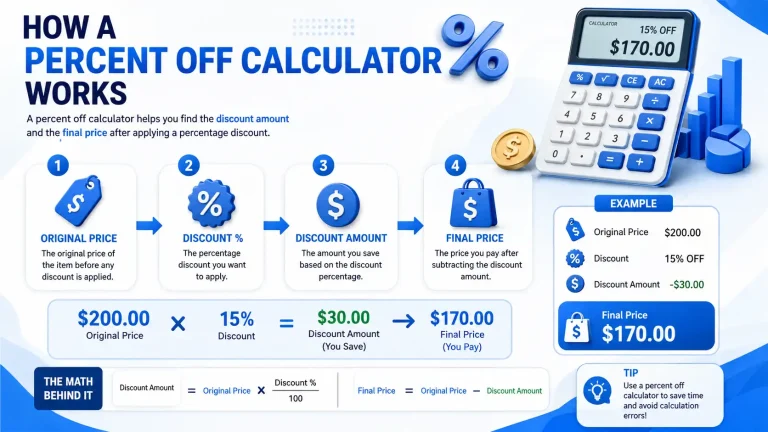
The basic discount formula is:
Discount Amount = Original Price × (Discount Percentage ÷ 100)
After finding the discount amount, subtract it from the original price:
Final Price = Original Price − Discount Amount
Example: Calculate a 20% Discount
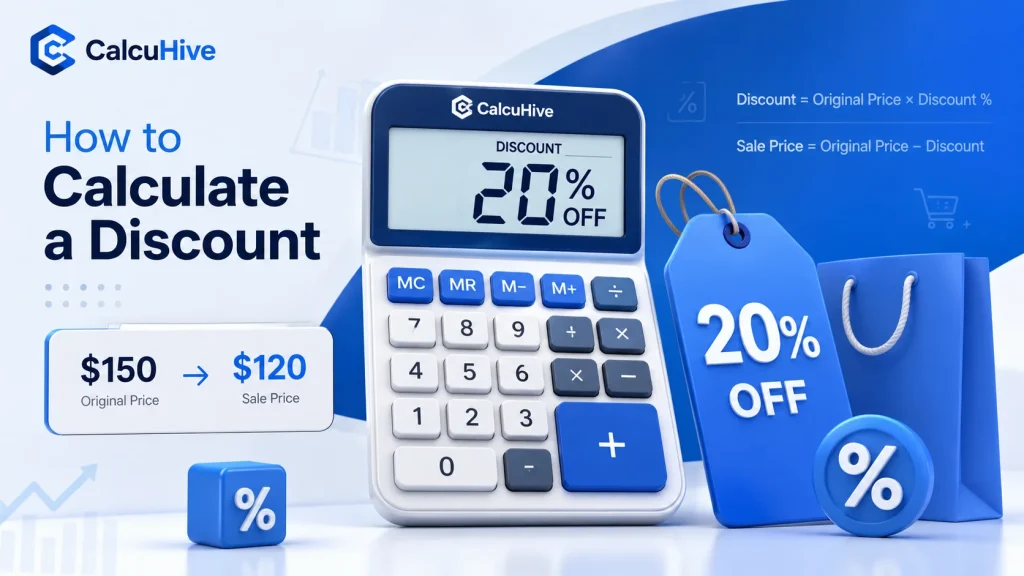
Suppose a pair of shoes costs $150 and is advertised at 20% off.
First, calculate the discount:
$150 × (20 ÷ 100) = $30
So, the discount amount is $30.
Now subtract the discount from the original price:
$150 − $30 = $120
Therefore:
- Original price: $150
- Discount: 20%
- Money saved: $30
- Final price: $120
You can perform the same calculation for almost any percentage discount.

How to Calculate discount 10% Off
A 10% discount is particularly easy to calculate.
For example, suppose an item costs $80.
$80 × 10 ÷ 100 = $8
The discount is $8.
Then:
$80 − $8 = $72
So, an $80 product with a 10% discount costs $72.
How to Calculate 25% Off
Let’s say a product costs $200 and has a 25% discount.
Calculate the discount:
$200 × 25 ÷ 100 = $50
Then calculate the sale price:
$200 − $50 = $150
You save $50 and pay $150.
Another quick way to think about a 25% discount is that you pay 75% of the original price:
$200 × 0.75 = $150
How to Calculate 50% Off
A 50% discount means the price has been reduced by half.
For example, if an item costs $90:
$90 × 50 ÷ 100 = $45
The discount is $45, so the final price is:
$90 − $45 = $45
Therefore, 50% off an item means you pay half of its original price.
Discount Calculator Formula
If you want to calculate a discount manually, you can use these two formulas.
Discount Amount
Discount = Original Price × Discount Percentage ÷ 100
Final Sale Price
Final Price = Original Price − Discount
For example, with an original price of $250 and a discount of 15%:
Discount = $250 × 15 ÷ 100
Discount = $37.50
Then:
Final Price = $250 − $37.50
Final Price = $212.50
You would save $37.50 and pay $212.50.
How to Use a Discount Calculator
If you do not want to figure out the percentage by yourself an online How to Calculate a Discount can do the math for you.
You can use the CalcuHive Discount Calculator to quickly find out discounts and sale prices for products.
The basic process is really simple:
- Enter the price of the product.
- Enter the discount percentage that you want to calculate.
- Calculate the result to see the discount.
- Check the discount amount and the final price of the product.
This is especially useful when you are shopping online for products comparing sale prices of products checking promotional offers for products or calculating discounts, for the product you want to buy.s and services.
Calculate Discount Percentage From the Original and Sale Price
Sometimes you know the original price and the sale price, but you don’t know what percentage discount was applied.
In that situation, you can calculate the discount percentage using this formula:
Discount Percentage = (Original Price − Sale Price) ÷ Original Price × 100
Example
Suppose a product originally cost $120, but the sale price is $90.
First, find the discount amount:
$120 − $90 = $30
Now calculate the percentage:
$30 ÷ $120 × 100 = 25%
Therefore, the product was discounted by 25%.
This calculation can be useful when comparing different sales and determining whether a retailer’s advertised discount matches the actual price reduction.
How to Find the Original Price After a Discount
Another common situation is knowing the sale price and How to Calculate a Discount but not the original price.
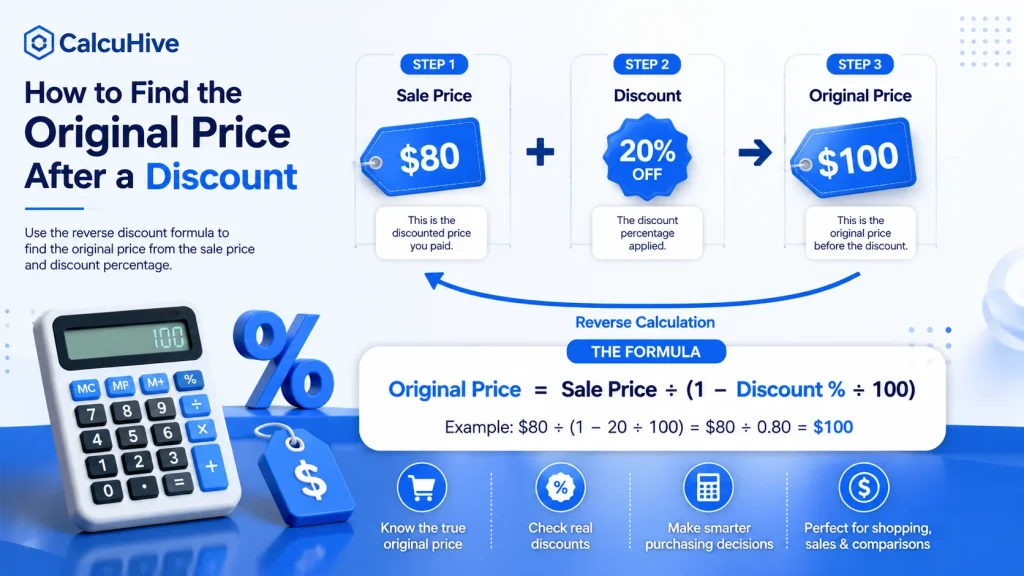
For example, suppose you bought an item for $80 after a 20% discount. What was the original price?
Because a 20% discount means you paid 80% of the original price:
Original Price = Sale Price ÷ (1 − Discount Percentage ÷ 100)
Using the example:
$80 ÷ (1 − 20 ÷ 100)
$80 ÷ 0.80 = $100
So the original price was $100.
This is sometimes called a reverse discount calculation.
How to Calculate Multiple Discounts
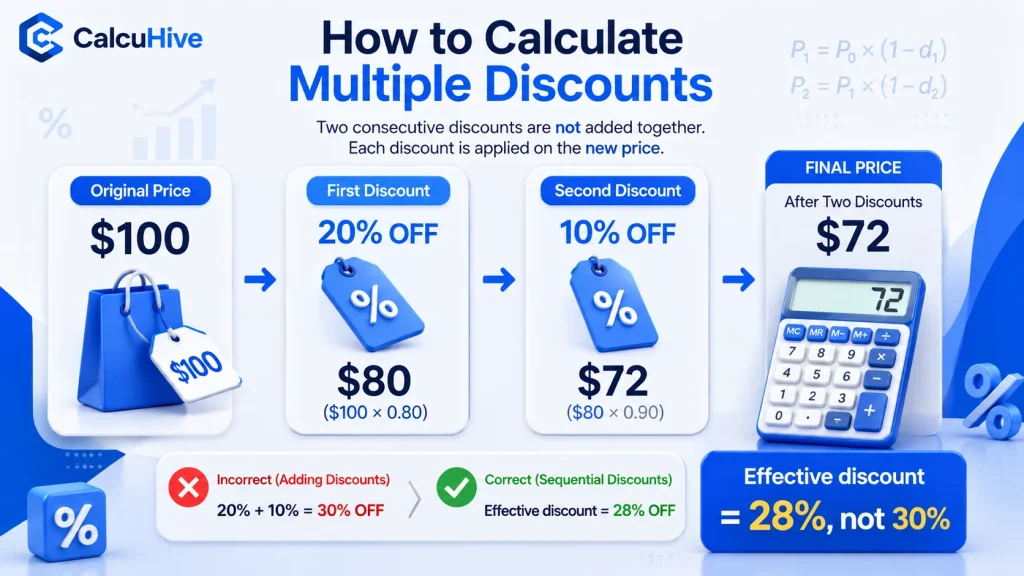
Be careful when a store advertises two discounts, such as 20% off followed by another 10% off.
You cannot simply add the percentages and assume the total discount is 30%.
For example, suppose an item costs $100.
First discount:
$100 − 20% = $80
Then apply the second 10% discount to the reduced price:
$80 − 10% = $72
The final price is $72.
You saved:
$100 − $72 = $28
So the effective total discount is 28%, not 30%.
This happens because the second discount is calculated from the already-discounted price.
Discount Examples
Here are some quick examples of common discounts:
| Original Price | Discount | Money Saved | Final Price |
|---|---|---|---|
| $50 | 10% | $5 | $45 |
| $80 | 15% | $12 | $68 |
| $100 | 20% | $20 | $80 |
| $150 | 25% | $37.50 | $112.50 |
| $200 | 30% | $60 | $140 |
| $500 | 40% | $200 | $300 |
The same discount formula works regardless of the original price.
Why Use a Discount Calculator?
Although discount calculations are relatively simple, an online calculator can save time and reduce the chance of making a mistake. learn how to How to Calculate a Discount .
A discount calculator can be useful when:
- Shopping during sales
- Comparing different products
- Checking percentage-off promotions
- Calculating savings
- Working out sale prices
- Comparing multiple discounts
- Checking prices before buying
- Calculating discounts for a business
- Finding the original price from a discounted price
For larger purchases, calculating the exact dollar saving can also make it easier to compare different offers.
Discount vs Sale Price
The discount amount and sale price are not the same thing.
The discount amount is how much money has been taken off the original price.
The sale price is what you pay after the discount.
For example:
Original price = $300
Discount = 20%
Discount amount = $60
Sale price = $240
So you save $60, while the final price is $240.
Understanding this difference is important when comparing deals.
How to Calculate a Discount on a Calculator
You can calculate a percentage discount using a regular calculator.
For a $250 item with a 20% discount:
250 × 20 ÷ 100 = 50
The discount is $50.
Then:
250 − 50 = 200
The final price is $200.
Alternatively, you can calculate the amount you pay directly:
250 × (1 − 20 ÷ 100) = 200
So, if you frequently calculate discounts, a dedicated discount percentage calculator can make the process faster.
Calculate Discounts Quickly With CalcuHive
You don’t need to calculate every discount manually.
The CalcuHive Discount Calculator is designed to make percentage discount calculations quick and straightforward. Simply enter the relevant price and discount percentage to work out the savings and final price.
Try the CalcuHive Discount Calculator
Whether you’re checking a shopping sale, comparing prices, or calculating a discount for a product, an online calculator can help you get the result quickly.

Final Thoughts
Learning how to calculate a discount can help you understand sale prices and make better purchasing decisions. The basic process is straightforward: calculate the discount amount, then subtract it from the original price.
For example, a 20% discount on $150 gives you a $30 saving, leaving a final price of $120.
If you want a faster way to calculate discounts, use the free CalcuHive Discount Calculator to work out percentage discounts, savings, and final prices without doing the maths manually.
Frequently Asked Questions About Discounts
How do I calculate a discount?
Multiply the original price by the discount percentage divided by 100. Then subtract the discount amount from the original price.
Discount = Original Price × Discount % ÷ 100
How do I calculate 20% off?
Multiply the original price by 20 and divide by 100. For example, 20% of $100 is $20, so the final price is $80.
What is the easiest way to calculate a discount?
The easiest method is to use a free online discount calculator. Enter the original price and discount percentage to quickly find the savings and final price.
How do I calculate the discount percentage?
Subtract the sale price from the original price, divide the result by the original price, and multiply by 100.
Discount % = (Original Price − Sale Price) ÷ Original Price × 100
How do I find the original price after a discount?
Divide the sale price by the amount remaining after the discount.
Original Price = Sale Price ÷ (1 − Discount % ÷ 100)
For example, if something costs $80 after a 20% discount:
$80 ÷ 0.80 = $100
Is 20% off the same as 20% of the price?
Yes. A 20% discount means the discount amount is 20% of the original price. However, the amount you pay is the remaining 80%.